
Support
ReelIQ Support — Get started in 60 seconds.
Three steps from download to your first logged catch.
Download from the App Store
No account, email, or sign-up. Just download and open.
Set up your profile
Takes 30 seconds. Makes everything else easier — see below.
Snap your first catch
Photo → AI identifies it → conditions auto-fill → save. Done.
Want the full walkthrough of every screen?
Read the How-To GuideSet up your profile FIRST. It does the heavy lifting.
Skip the typing. When you tell ReelIQ which US state you fish in, it instantly populates your species list with the top 10 game fish for that state — Walleye, Northern Pike, and Smallmouth Bass for Minnesota; Largemouth, Snook, and Tarpon for Florida; Trout, Salmon, and Steelhead for Washington — plus the top 10 most-fished water bodies (Mille Lacs, Lake Okeechobee, Lake Sakakawea, and more).
One tap, and your catch screens are pre-filled with the names you actually use. No more typing "Walleye" 50 times.
How: Settings → Profile → pick your state → tap "Add to My Lists" when prompted.
FAST BY DESIGN
Log a catch in seconds.
Most anglers log a fish faster than they untangle a backlash. Here's the whole flow:
- 1
Snap or pick a photo
Camera, library, or skip the photo entirely.
- 2
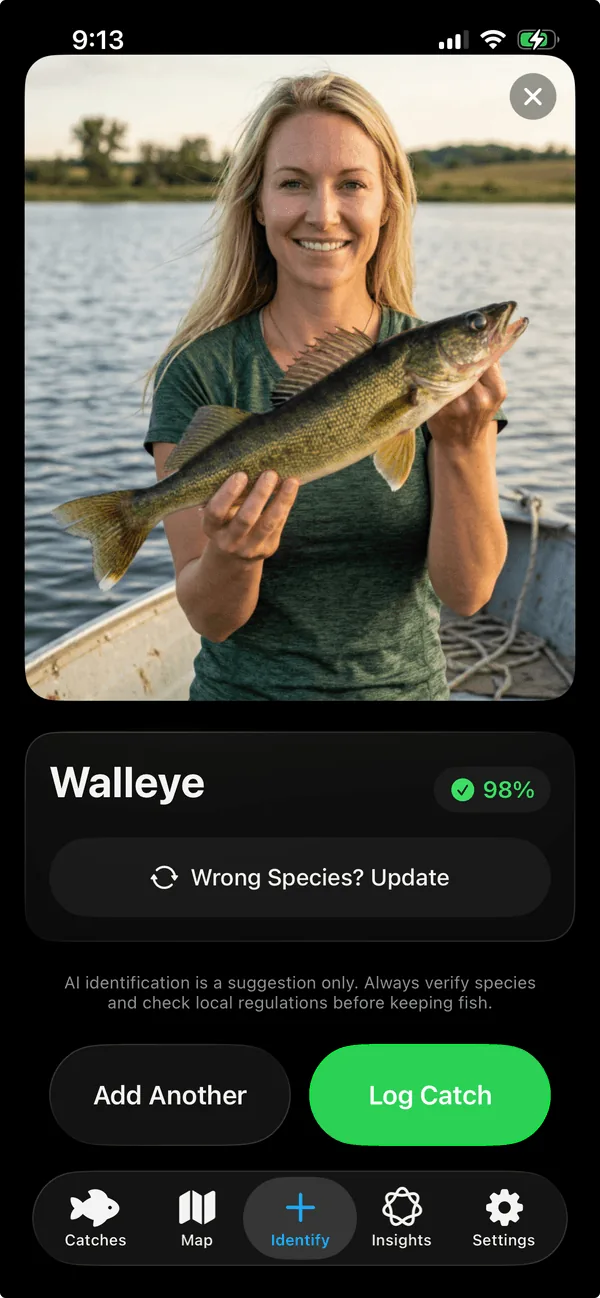
ReelIQ identifies the species
1–2 seconds, on-device, no internet needed.
- 3
Conditions auto-fill
Weather, barometric pressure, moon phase, water body, water temp estimate, GPS — all in the background while you frame the shot.
- 4
Tap Save
Done. Total time: Seconds, back to fishing!
Pro Tips
Go deeper.
Four features most users don't discover until they've logged a few catches.
Quick Log Defaults
Set your usual rig once — bait, technique, structure, water body — and one-tap log with everything pre-filled. Settings → Quick Log Defaults.
AR length measurement
Point your phone at the fish, tap the head, tap the tail. The app measures it and auto-fills the length into your log. On the Identify screen.
Bite Prediction (Today tab)
Once you've logged 5 catches, the Today tab predicts your bite from YOUR history. Tap any species chip to see when that fish is biting today.
Wrong species? Update.
If the AI's first guess is off, tap "Wrong Species? Update" under the result. Pick from its alternative top guesses or search manually.
ReelIQ Pro
How Pro membership works.
Subscribing, the free trial, cancellation, refunds — everything you might need.
Pro unlocks every advanced feature: unlimited catches (vs. 10 on free), the Today bite score with hourly outlook, full Insights, the personalized 7-day forecast, the Solunar feeding calendar, the catch heatmap and full map filters, branded share cards, data export, and Home Screen widgets. Anything we add to the Pro tier in the future is included in your existing subscription at no extra cost.
You'll see the upgrade option in the app at natural moments — like when you reach your 10th catch on the free tier, or when you tap a Pro-only feature. Choose monthly or yearly, confirm with Face ID, Touch ID, or your Apple ID password. The subscription activates instantly and Pro features unlock right away.
The yearly plan ($29.99/year) includes a 7-day free trial for new subscribers — first-time only. During the trial you have full access to every Pro feature. If you cancel before the 7 days end, you're not charged and you revert to the free tier. If you don't cancel, the trial converts automatically to a paid yearly subscription on day 7. There's no extra confirmation step, so set a reminder if you're not sure.
Open iOS Settings on your iPhone → tap your name at the top → Subscriptions → ReelIQ → Cancel Subscription. There's no penalty. You keep Pro access until the end of your current billing period, then revert to the free tier. Your catches stay on your device — only the Pro features get locked.
When you sign into your Apple ID on a new iPhone, ReelIQ automatically detects your active subscription and unlocks Pro. If for some reason it doesn't, tap Settings inside the app → Restore Purchases. As long as you're signed in with the same Apple ID, your Pro access comes back.
Refunds are handled entirely by Apple — we don't see your payment info and can't process refunds ourselves. Visit reportaproblem.apple.com, sign in with your Apple ID, find your ReelIQ purchase, and request a refund. Apple decides whether to grant it. We have no input on that decision, but if there's an issue with the app, please contact us first — we may be able to help directly before you go through Apple.
Your catches stay exactly where they are — on your iPhone, viewable forever. Cancelling Pro doesn't delete a single catch, regardless of how many you've logged. After your billing period ends, two things change: (1) the Pro features (Today bite score, Insights, forecast, etc.) lock until you re-subscribe; (2) you can't add new catches past the free 10-log limit until you subscribe again. Existing catches stay viewable, untouched. Re-subscribing instantly unlocks everything again with all your data intact.
Frequently Asked
The questions anglers actually ask.
Direct, honest answers — no marketing fluff.
Yes. Species identification runs entirely on-device — no signal needed. Weather and forecast features need internet (they pull from Apple's Weather Service), but everything else works in dead zones.
Always. Your GPS coordinates and photos never leave your iPhone. There's no account, no server, no shared database. Other anglers cannot see where you fish. Period.
The result screen has a "Wrong Species? Update" button right under the AI's guess. Tap it for the model's alternative top guesses, or pick "Other" to enter the species manually. The corrected species is what gets logged.
The on-device model recognizes 775 species. Accuracy is best for North American freshwater game fish — bass, walleye, pike, salmon, trout, panfish — which is what most anglers target. Holding the fish horizontally with the whole body visible gives the best results.
No. There's no sign-up, no email, no password. You download the app and start logging.
Yes — your catches, photos, profile, and settings are included in your iPhone's automatic iCloud Backup when enabled. If you get a new iPhone, restoring from your iCloud Backup brings everything back. ReelIQ never has access to this backup.
You can share individual catches as branded share cards. A full data export option is planned for a future release.
Yes — the species database includes Redfish, Snook, Tarpon, Bonefish, Spotted Seatrout, Mahi-Mahi, and many other inshore/offshore species. Best support is for North American waters.
Not yet. ReelIQ is iOS-only and uses several iPhone-specific features (Apple's Weather Service, on-device machine learning, Liquid Glass UI). Android support isn't planned.
The app runs on iPad in iPhone-compatibility mode. A native iPad layout is on the roadmap.
Two big differences: (1) Privacy — your data never leaves your phone. Most fishing apps monetize by aggregating user spots and conditions into a shared database. We don't. (2) Personal AI — ReelIQ's bite prediction learns from your catches, not a crowd dataset, so its recommendations get sharper the more you fish.
Currently free during early access. A subscription tier is planned for a future release, with a free trial on the monthly plan. The first 5 catches will always be free.
Yes — tap the share button on a catch detail and ReelIQ generates a branded share card. Send it via Messages, Instagram, Facebook, email, AirDrop, or any app via the iOS share sheet.
Location (to tag where you caught the fish + auto-fetch weather), Camera (to take photos), and that's it. Photos works through the iOS sandboxed picker — no library permission required. You can review and change all of these in Settings → Permissions.
AI species identification is a suggestion only and may not be accurate. Always verify species and check local regulations.
Still need help?
Try the full How-To guide first — it walks through every screen. Still stuck? Email us directly. We're a small team and we read every message.